$ 0018. User Authentication and Session with MongoDB in Django
| Author | luna-negra |
| Created On | 2024-11-23 07:22:00+00:00 |
| Edited On | 2024-11-23 07:22:00+00:00 |
| Tags | #django #mongo db #user authentication #session control |
I. Preview
If you are planning to create your own website with any web-framework, you have to select DBMS. Most web frameworks support ORM so you don't have to know much about how to control db with shell.
Django also support some DBMS for saving data. However Django supports Relational RDBMS - MySQL, PostgreSQL, SQLITE3 - basically, you have to do some additional work to use the other Non-Relational database such as MongoDB.
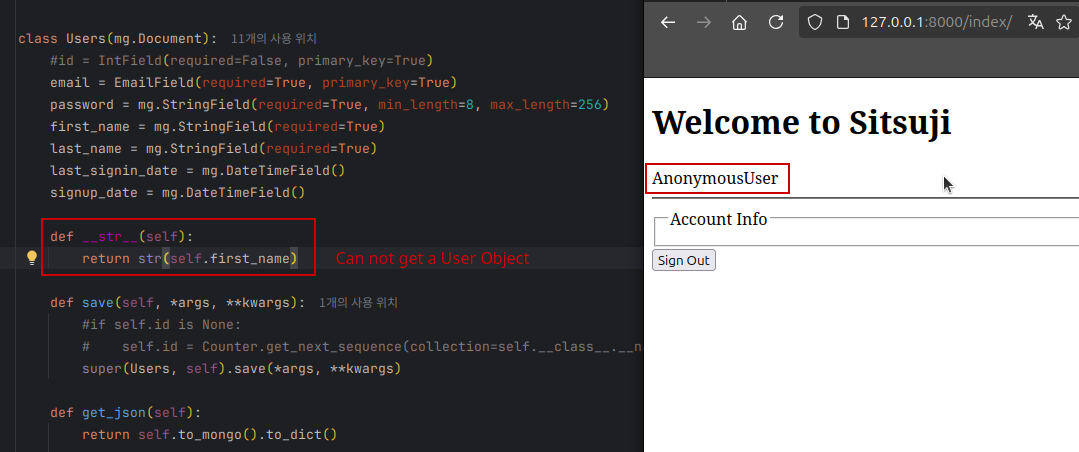
The real problem with database not supported by Django is, you can not use Django's function which are related with user control. If you create a model with 'mongoengine', you might face with some issues during test for login process. For example, you may see the issue if you create your model with non-IntField as a primary key or if you change __str() method in model class to return non integer value.
In this post, I will demonstrate how to create user model with Mongo DB to use django's authentication and session logic.
II. Django Setting
When the user sign in django webpage,
- Django views.py get a sign in user's information.
- Internal logic - forms.py - for input value would validate input values.
- Django UserBackend class authenticate username and password.
- authenticate() method containing check_password() method in backend class will return user object with sign in user if username and password matches.
- get_user() method in backend class will return user object to request objects. In detail, it returns user object to 'request.user'
- with returned user object, Django do a login() process in django.contrib.auth package.
- In login() method, web session would be issued for signed in user and saved in browser cache.
Refer to the process above, first I have to add settings for backend and session on 'settings.py'.
1
2
3
4
5
6
7
8
9
10
: "settings.py"

...
// MongoDB Session
SESSION_ENGINE = 'django.contrib.sessions.backends.cache'
SESSION_COOKIE_AGE = 300

// MongoDB Authentication Backend
AUTHENTICATION_BACKENDS = ['BACKEND_PARENT_PATH_WITH_POINT']
...
*  Except 'cache' SESSION_ENGINE would be file, db and so on.
   - django.contrib.sessions.backends.file: you should also set the SESSION_COOKIE_PATH with folder path.
   - django.contrib.sessions.backends.db: This require DATABASE setting variables in 'settings.py'
*  Example of AUTHENTICATION_BACKENDS
   - ['APP_NAME.FILE_NAME.BACKEND_CLASS_NAME']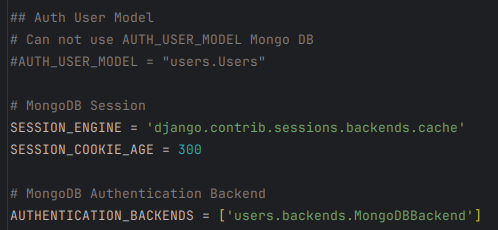
I create another python file to save BACKEND_CLASS with name backends.py in app folder.
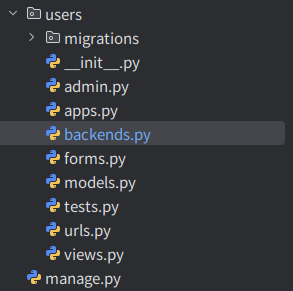
Now, I will create a new application named 'users' in my django project, and write down codes for using Django's user authentication process with MongoDB. For this, I create 'urls.py', 'forms.py', 'models.py' as below.
1
2
3
4
5
6
7
8
9
10
11
12
13
14
: "urls.py"

from django.urls import path, include
from . import views


app_name: str = "users"
urlpatterns: list = [
    path("", views.access, name="access"),
    path("index/", views.index, name="index"),
    path("signin/", views.signin, name="signin"),
    path("signout/", views.signout, name="signout"),
    path("signup/", views.signup, name="signup"),
]
1
2
3
4
5
6
7
8
9
10
11
12
13
14
15
16
17
18
19
20
21
22
23
24
25
26
27
28
29
30
31
32
33
34
35
36
37
38
39
40
41
42
43
44
45
46
47
48
49
50
51
52
53
54
55
56
57
58
59
60
61
62
63
64
65
66
67
68
69
70
: "views.py"

from django.shortcuts import render, redirect
from django.views.decorators.http import require_http_methods, require_GET, require_POST

from users.forms import *

# Create your views here.

TEMPLATE_PATH: str = "users/"


@require_GET
def access(request):
    return redirect(to="/index")


@require_GET
def index(request):
    if request.session.session_key is None:
        return redirect(to="/signin")

    context = {}
    return render(request=request,
                  template_name=f"{TEMPLATE_PATH}index.html",
                  context=context)


@require_http_methods(["GET", "POST"])
def signin(request):
    if request.session.session_key is not None:
        return redirect(to="/index")

    context = {"form": SignInForm()}

    if request.method == "POST":
        form = SignInForm(request=request, data=request.POST)
        if form.is_valid():
            form.save()
            return redirect(to="/index")

        context["form"] = form

    return render(request=request,
                  template_name=f"{TEMPLATE_PATH}signin.html",
                  context=context)


@require_http_methods(["GET", "POST"])
def signup(request):
    if request.session.session_key is not None:
        return redirect(to="/index")

    context = {"form": SignUpForm()}

    if request.method == "POST":
        form = SignUpForm(data=request.POST)
        if form.is_valid():
            form.save()
            return redirect(to="/index")

        context["form"] = form

    return render(request=request,
                  template_name=f"{TEMPLATE_PATH}signup.html",
                  context=context)

@require_POST
def signout(request):
    return redirect(to='/')
1
2
3
4
5
6
7
8
9
10
11
12
13
14
15
16
17
18
19
20
21
22
23
24
25
26
27
28
29
30
31
32
33
34
35
36
37
38
39
40
41
42
43
44
45
46
47
48
49
50
51
52
53
54
55
56
57
58
59
60
61
62
63
64
65
66
67
68
69
70
71
72
73
74
75
76
77
78
79
80
81
82
: "forms.py"

import mongodbforms as mf
from django import forms
from django.contrib.auth.hashers import make_password
from django.core.exceptions import ValidationError


from users.models import Users


class SignInForm(mf.DocumentForm):
    class Meta:
        model = Users
        fields = [
            "email",
            "password",
        ]
        widgets = {
            "email": forms.EmailInput(attrs={"placeholder": "Enter your Email"}),
            "password": forms.PasswordInput(attrs={"placeholder": "Enter your password"}),
        }

    def __init__(self, *args, **kwargs):
        self.request = kwargs.pop('request', '')
        self.user = None
        super().__init__(*args, **kwargs)

    def clean(self):
        data = self.data
        email = data.get("email", "")
        password = data.get("password", "")

    def save(self):
        pass


class SignUpForm(mf.DocumentForm):

    password_retype = mf.CharField(widget=forms.PasswordInput())
    class Meta:
        model = Users
        fields = [
            "email",
            "password",
            "password_retype",
            "first_name",
            "last_name",
        ]
        widgets = {
            "email": forms.EmailInput(attrs={"placeholder": "Type your Email as an Username"}),
            "password": forms.PasswordInput(attrs={"placeholder": "Type your password"}),
            "first_name": forms.TextInput(attrs={"placeholder": "Type your first name"}),
            "last_name": forms.TextInput(attrs={"placeholder": "Type your last name"}),
        }

    def clean_email(self):
        email = self.data.get("email", "")
        if Users.objects(email=email).first() is not None:
            raise ValidationError("Email is already registered")
        return email

    def clean_password(self):
        pw = self.data.get("password", "")
        pw_re = self.data.get("password_retype", "")
        if pw != pw_re:
            raise ValidationError("Password is not match.")
        return make_password(password-=pw)

    def clean_first_name(self):
        name = self.data.get("first_name", "")
        return f"{name[0].upper()}{name[1:]}"

    def clean_last_name(self):
        name = self.data.get("last_name", "")
        return f"{name[0].upper()}{name[1:]}"

    def save(self):
        data = {k:v for k,v in self.cleaned_data.items()}
        data.pop("password_retype")
        new_user = Users(**data)
        new_user.save()
1
2
3
4
5
6
7
8
9
10
11
12
13
14
15
16
: "models.py"

import mongoengine as mg


class Users(mg.Document):
    id = mg.IntField(required=False, primary_key=True)
    email = mg.EmailField(required=True)
    password = mg.StringField(required=True, min_length=8, max_length=256)
    first_name = mg.StringField(required=True)
    last_name = mg.StringField(required=True)
    last_signin_date = mg.DateTimeField()
    signup_date = mg.DateTimeField()

    def __str__(self):
        return str(self.id)
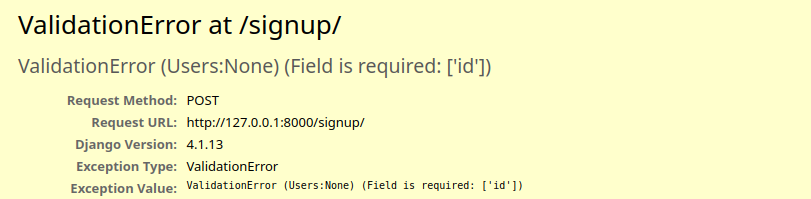
In this status, you can access 'signin' and 'signup' page only. In 'signup' page, you can input information of your new account, but Mongo DB does not support auto-increment in IntField, You can not save your new account information in database.
III. Primary Key with IntegerField
To use auto-increment in IntField with 'mongoengine' you have to create another collection that control your ID sequence. For this, I create another model named Counter in 'models.py' file.
1
2
3
4
5
6
7
8
9
10
11
12
13
14
15
16
: "models.py"
...

class Counter(mg.Document):
    collection = mg.StringField(required=True, primary_key=True)
    sequence = mg.IntField()

    @classmethod
    def get_next_sequence(cls, collection):
        current_sequence = cls.objects(collection=collection).modify(
            upsert=True,
            new=True,
            inc__sequence=1
        )

...
*  upsert=True: If the document does not exist, MongoDB creates a new one.
*  new=True: Returns the document after the update operation is applied.
*  inc__sequence_value=1: Increments the sequence_value field by 1.
*  'inc__' is a MongoDB prefix for Increment.
And create a save() method in User model, so make the new user has the latest sequence number.
1
2
3
4
5
6
7
8
9
10
11
: "models.py"

...
class Users(mg.Document):
    ...
    def save(self, *args, **kwargs):
        if self.id is None:
            self.id = Counter.get_next_sequence(collection=self.__class__.__name__)
        super(Users, self).save(*args, **kwargs)
    ...
...
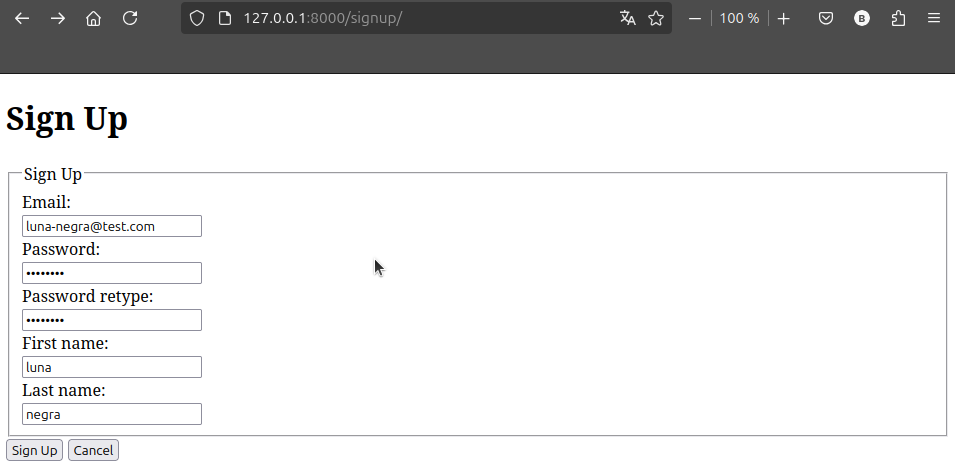
After editing code like above, you can save your new account in your database, and id value will be assigned automatically.
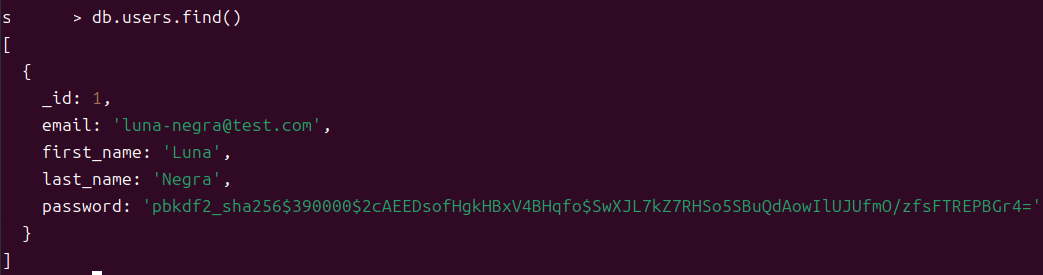
In this status, let me create a login process in SignInForm(). First, I create a authentication process in clean() method. To check the password for each user, it is recommended to use 'check_password()' function in 'django.contrib.auth.hashers' package.
Before doing this, be advised that the authentication process in Django will use backend to authenticate and assigning session to signed in user. Therefore it is also recommended to create a authenticate() in custom backend. I will create a new file 'backends.py' and write a code for custom user backend.
1
2
3
4
5
6
7
8
9
10
11
12
13
14
15
16
17
18
: "backends.py"

from django.contrib.auth.backends import BaseBackend
from django.contrib.auth.hashers import check_password
from users.models import Users


class MongoDBBackend(BaseBackend):

    def authenticate(self, request, **kwargs):
        try:
            user = Users.objects.get(email=kwargs.get("email", ""))
        except Users.DoesNotExist:
            return None

        if check_password(password=kwargs.get("password", ""), encoded=user.password):
            return user
        return None
* authenticate() method is a override form from BaseBackend. And I will use this method in clean() method for sign in process, therefore,
1
2
3
4
5
6
7
8
9
10
11
12
13
14
15
16
17
18
19
20
21
22
23
24
: "forms.py"
from .backends import MongoDBBackend

...
class SignInForm(mf.DocumentForm):
    ...
    def __init__(self, *args, **kwargs):
        self.request = kwargs.pop('request', '')
        self.backend = MongoBackend()
        self.user = None

    def clean(self):
        data = self.data
        email = data.get("email", "")
        password = data.get("password", "")

        user = self.backend.authenticate(request=self.request,
                                         email=email,
                                         password=password)
        if user is None:
            raise ValidationError("Email and Password is not match")

        self.user = user
...
If you print out self.user at the end of the SignInForm.clean() method, and the user information is matched, you can see the user' pk on the shell.

The final work is writing down codes in save() method. I have a authenticated user objects, so login session will be assigned to this user objects and request objects also have this user objects as a value of 'user' key. 'request.user' will be get a user object from get_user() method in backend class, and get_user() only accept pk value as a argument.
Therefore, get_user() method in backend class will be like below.
1
2
3
4
5
6
7
8
9
10
11
12
: "backends.py"

...
class MongoDBBackend(BaseBackend):
    ...
    def get_user(self, id: int):
        try:
             return Users.objects(pk=id).first()
        except Users.DoesNotExist:
             return None

...
Finally, let me write down the save() method in SignInForm class. This method is charge of login for authenticated user, so I have to use login() method which is located in 'django.contrib.auth' package.
1
2
3
4
5
6
7
8
9
10
: "forms.py"
from django.contrib.auth import login

...
class SignInForm(mg.DocumentForm):
    ...
    def save(self):
        if self.user is not None:
            login(request=self.request, user=self.user)
...
But, it does not work, because fields class derived from 'mongoengine' does not have 'value_to_string()' method, so Django can not execute its internal code anymore.

To solve this problem, I have to create a new fields and make the 'id' variable in user model use newly created field.
1
2
3
4
5
6
7
8
: "fielsd.py"

from mongoengine import IntField as mi


class IntField(mi):
    def value_to_string(self, value):
        return str(value)
1
2
3
4
5
6
7
8
9
10
: "models.py"

import mongoengine as mg
from fields import IntField


class Users(mg.Document):
    id = IntField(required=False, primary_key=True)
    ...
...

If you want to print out user info on index page, add DTL in index.html and edit index() function in 'views.py'.
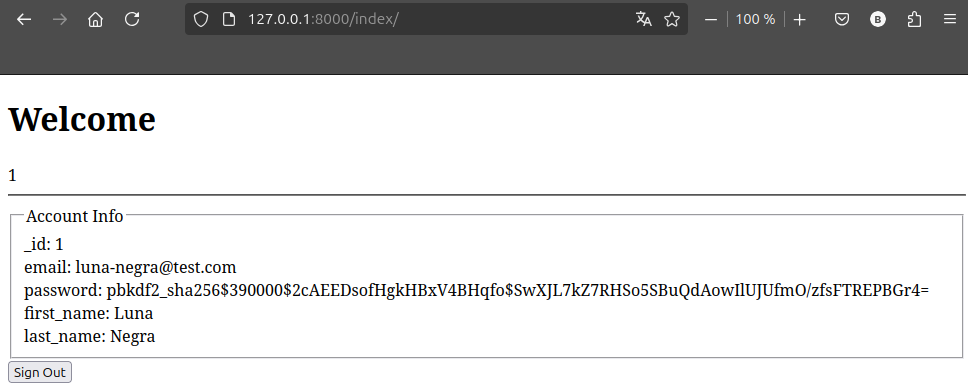
IV. Primary Key with StringField
Now, I will change the field that has option primary_key as True. Because I am using email as a username, I want to set a email fields as a primary key. I get rid of all collections in database and re-design user model like below.
1
2
3
4
5
6
7
8
: "fields.py"

from mongoengine import EmailField as me


class EmailField(me):
    def value_to_string(self, value):
        return str(value)
1
2
3
4
5
6
7
8
9
10
11
12
13
14
: "models.py"
import mongoengine as me
from .fields import EmailField

class Users(mg.Document):
    email = EmailField(required=True, primary_key=True)
    ...

    def __str__(str):
        return self.email

    def save(self, *args, **kwargs):
        super(Users, self).save(*args, **kwargs)
...
At this stage, you can save your account and you can check the email fields becomes a primary key.
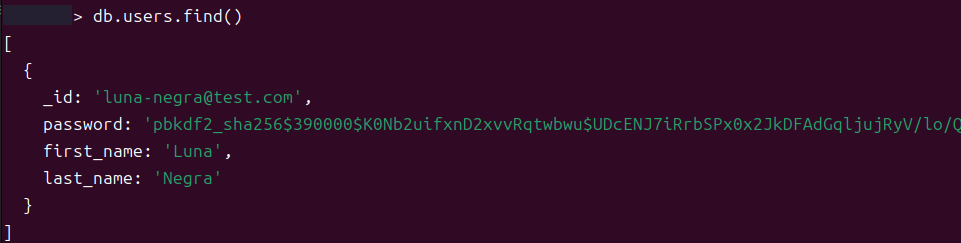
The authentication and login process is the same, so you can sign in with any problem. In comparing with previous example, you can see the user' email when you print out request.user info in 'index.html'.
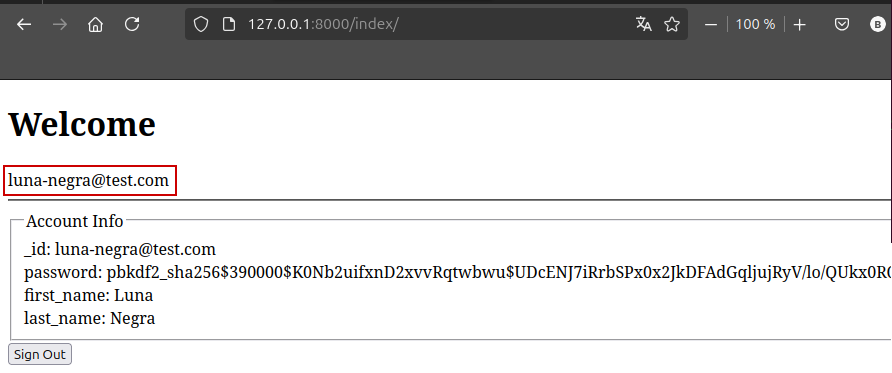
This protocol does not allow to change return value of __str__() method, because get_user() method in the custom backend refer to this return value when it tries to look user object.
V. References
- https://docs.djangoproject.com/en/4.2/ref/settings/#sessions
- https://docs.djangoproject.com/en/5.1/topics/auth/customizing/#specifying-authentication-backends
- https://docs.djangoproject.com/en/5.1/topics/auth/customizing/#specifying-authentication-backends
- https://docs.djangoproject.com/en/5.1/ref/settings/#sessions