$ 00013. Create Custom DNS server
| Author | luna-negra |
| Created On | 2024-09-09 08:56:00+00:00 |
| Edited On | 2024-09-09 08:56:00+00:00 |
| Tags | #Ubuntu #bind9 #custom DNS server #register custom domain |
I. Preview
Nowadays, most people in the internet uses URL address to access their target website. When a person types the "github.com" in address bar, your browser shows HTML contents to that person. Most servers have their own ip address and this address will be used to communicate each other. Then, how do the internet browsers map the URL and ip address?
There are so called DNS server, abbreviation of Domain Name Server. This server converts the url to ip address or vice versa. Most computers these days have a network interface, so when a computer is being connected to internet, DNS server is configured as a default.
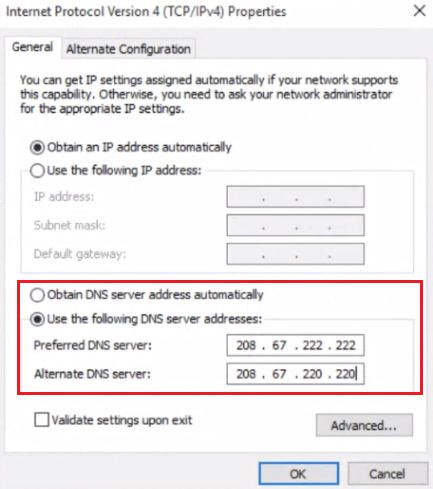
So, when you remove the DNS setting value, you can not access to the internet site
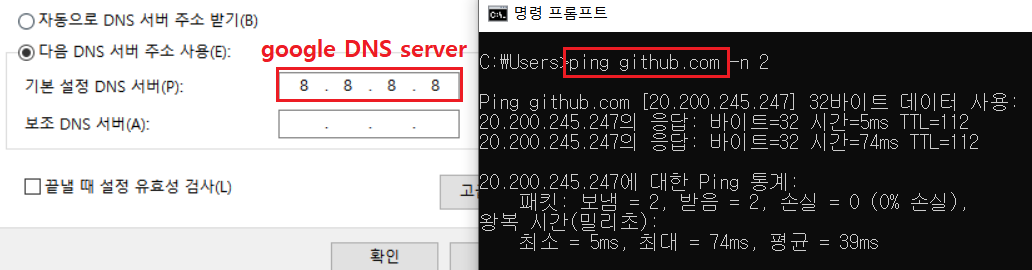

Then, How does the DNS work?
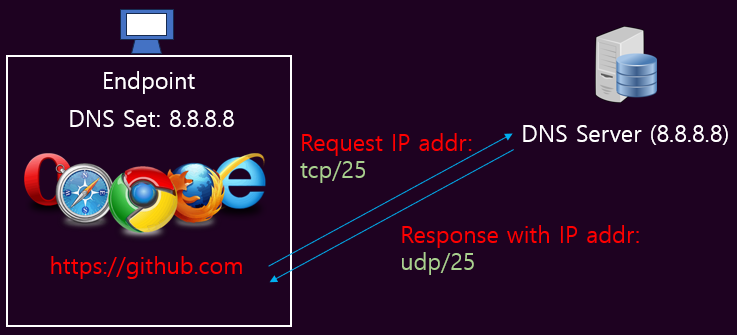
When the endpoint user types the URL address, the endpoint request the IP address of typed URL address to DNS server, which is designated on Network config. If the server exists and is alive, the DNS server will return the IP address mapping to the URL address. If there is no mapping IP address, endpoint user only can see an error "Not Connected to the Site".
This process is called DNS protocol, using port number 25. when the endpoint starts the request, packet is transferred by tcp protocol. Vice versa, packet which contains response is transferred by UDP protocol.
There are so many DNS server around the world. But you have to create a custom DNS server if you need your own network. In this post, I will show how to install DNS package and set config in ubuntu.
II. Set DNS Config
If you want to make your ubuntu server work as a DNS server, you have to install 'bind9' package.
1
2
#  :"Install 'bind9' package"
#  sudo apt-get install bind9 -y
# * It is recommended to install 'dnsutils' too.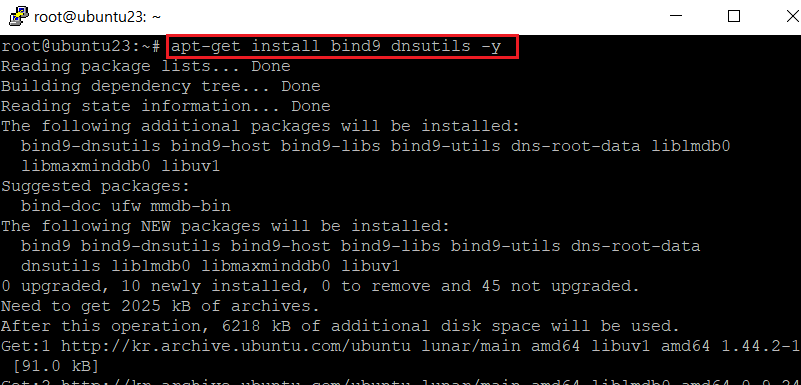
Once the 'bind9' package is installed successfully, you can see the service 'named' is running with command below.
1
2
#  :"Check the status of 'named' service"
#  sudo systemctl status named
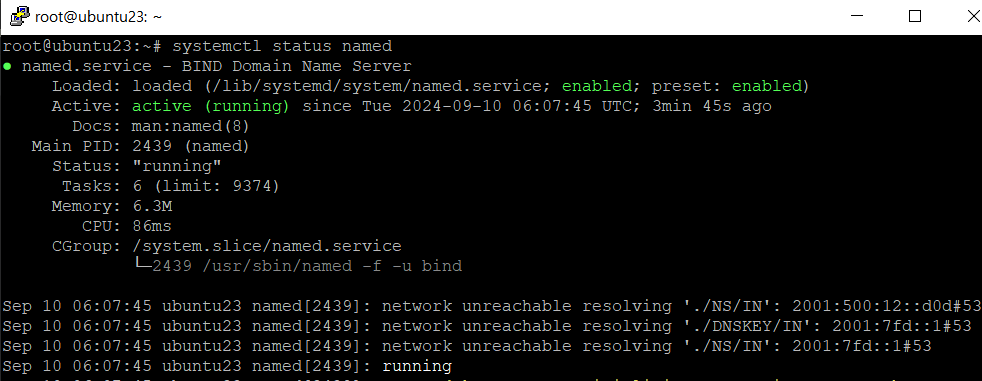
Like other linux packages, config files of 'bind9' are located on '/etc' folder, exactly in '/etc/bind'. There are so many files whose name starts with 'named.conf'.
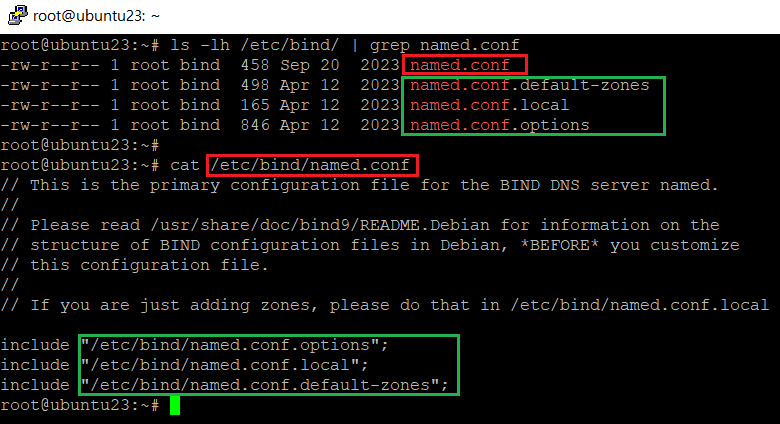
First, look at the file 'named.conf.options'. This file is charge of main settings of named service. So you can set the 'listen address', or 'allow ip list' and so on. There are so many setting keys, but I will show a few key that can make DNS server work properly.
- listen-on [port NUMBER] { IP_ADDRESS; };
- allow-query { IP_ADDRESS OR NETWORK; }
- recursion [YES|NO]
Listen address is a server address that receives the DNS query. Now my linux's ip address is '10.10.92.85', so let me assign that address in 'listen-on'. Also, This server is only for the test, I will allow only endpoint in the same network segment to request to my custom DNS server. Last, If the custom DNS server does not return any values because there are no mapping data, let the DNS server relay the request to another DNS server and get the result. This process will be executed when the 'recursion' is set by 'yes'.
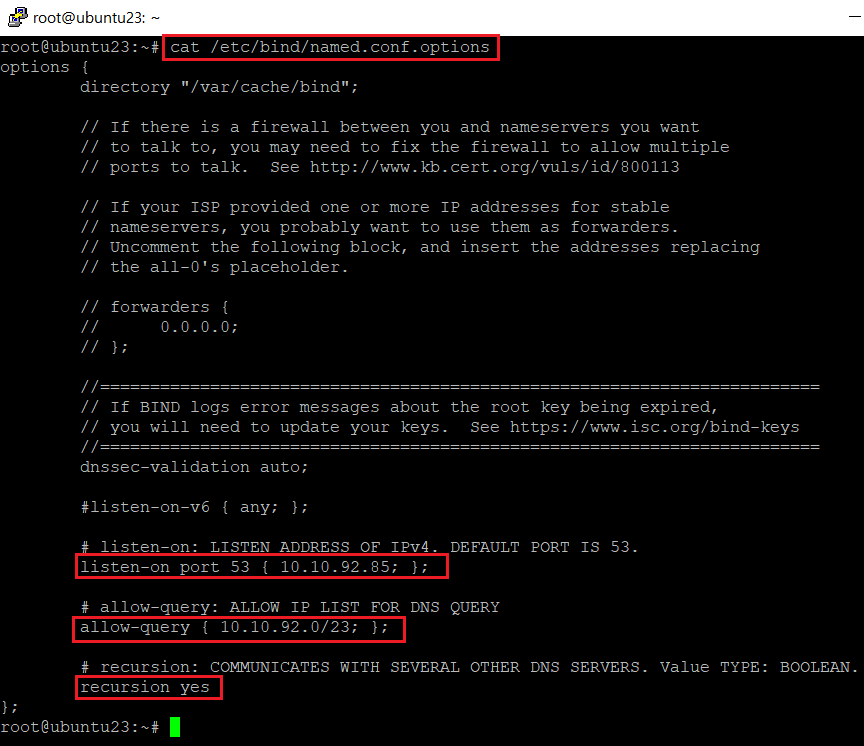
Second, config file is 'named.conf.default-zone', If you want to add new domain information to your custom DNS server, you should edit that file or create new zone file and include it in 'named.conf' file.
I will add new domain named 'luna-negra.com' to new file and include it in main config file.
1
2
3
4
5
#  :"New zone file"
#  zone "DOMAIN_NAME" IN {
#    type [master | slave | hint];
#    file "ZONE_INFO_FILE_PATH";
#  };
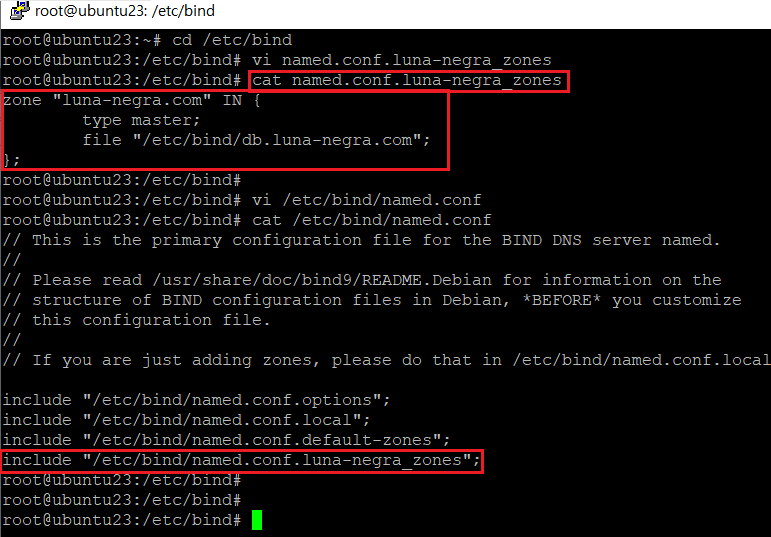
The 'zone' means a new domain that you want your DNS server to know. In the config above, my domain "luna-negra.com" refers to the "/etc/bind/db.luna-negra.com", which is called 'zone file', to answer the DNS query. So the zone file should be created and applied to the service.
You can validate whether there are issue in named.conf file or not, by using a command below.
1
2
#  :" Validate the named config"
#  sudo named-checkconf

If there is no issue on your config file, prompt does not return any text on the screen. On the other situation, you can see the error log as a result of the command.

Third, zone file for new zone 'luna-negra.com' should be created. If a request - example: 'www.luna-negra.com' - arrives at the DNS server, the server mapping the domain name - 'luna-negra.com' - first. Then, information of hostname - 'www' - will be found by Server at zone file - '/etc/bind/db.luna-negra.com'.
1
2
3
4
5
6
7
8
9
10
11
12
13
14
15
16
17
#  :" Zone file"
# $ORIGIN {DOMAIN_NAME.}
# $TTL TIME_TO_LIVE_IN_INTEGER
# @       IN      SOA      {NS_HOST.SERVER_DOMAIN.}   {root.SERVER_DOMAIN.} (
#                          1                          ; SerialNumber
#                          86400                      ; Refresh Time. required for slave server.
#                          3600                       ; Retry Time. required for slave server.
#                          604800                     ; Expire Time. required for slave server.
#                          604800                     ; Negative TTL
# );
#
#         IN      NS                    ns.{DOMAIN_NAME.}
#         IN      MX       10           mail.{DOMAIN_NAME.}      ;   The number is priority for several mail servers.
# ns      IN      A                     {NAMESERVER_IP}
# mail    IN      A                     {MAILSERVER_IP}
# www     IN      A                     {WEBSERVER_IP}
#
#  *  The unit of all SOA values in integer is second(time).
#  *  You can change it in simple form. ex) 86400 -> 1D, 3600 1h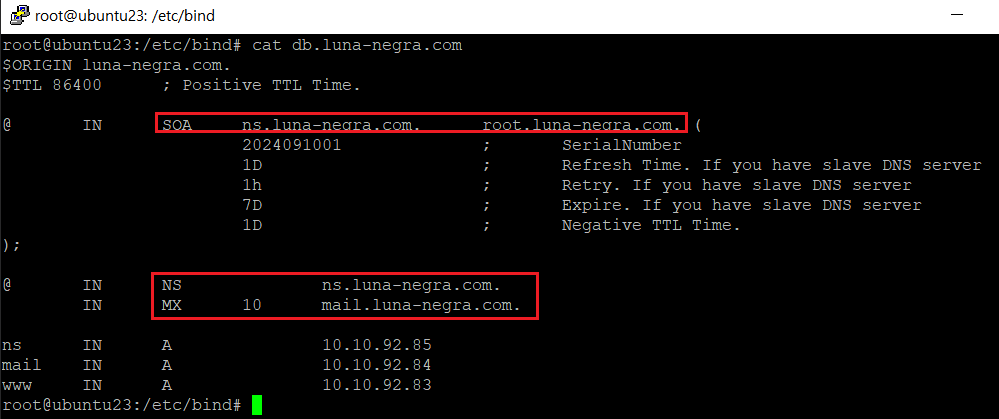
The zone file can be also validated by command 'named-checkzone'.
1
2
#  :"Check zone file"
#  sudo named-checkzone {ZONE_NAME} {ZONE_FILE_PATH}

If you finished to set the named config, restart the named service and open the DNS port at machine's firewall.
1
2
3
4
5
6
#  :"Restart named service"
#  sudo systemctl restart named
#
#  :"Open DNS port"
#  sudo firewall-cmd --add-port=53/tcp
#  sudo firewall-cmd --add-port=53/udp
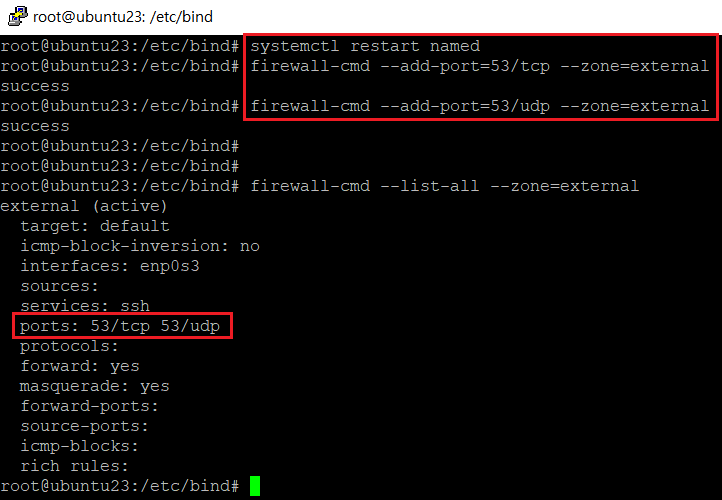
And make your linux host see the custom DNS server by editing '/etc/resolv.conf' file or network dns setting file in '/etc/netplan'.
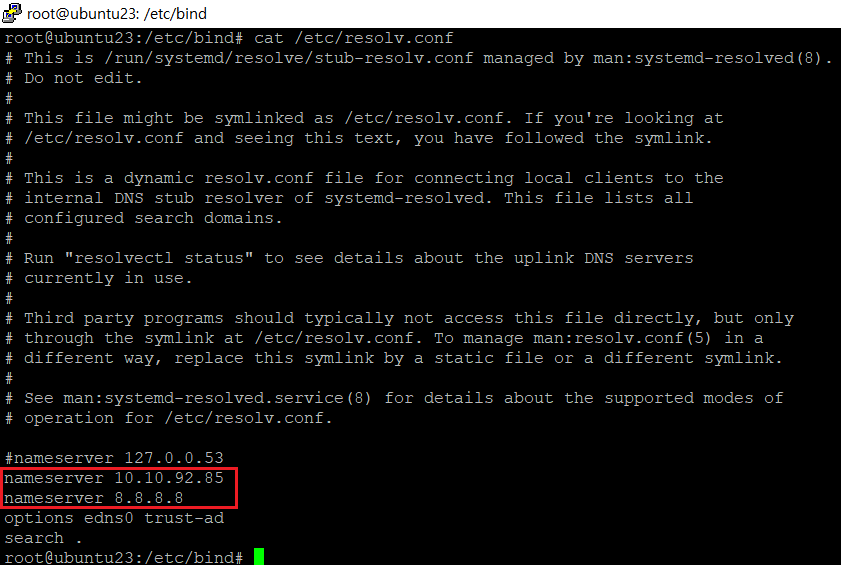
# * It is recommeded to locate your custom DNS server IP upper than global DNS server's one.III. Test Custom DNS
Let me test my custom DNS server. First, I will test it on the DNS server.
1
2
#  :"Request DNS Query"
#  dig www.luna-negra.com
# * You have to install dnsutils if you want to use 'dig' or 'nslookup' command.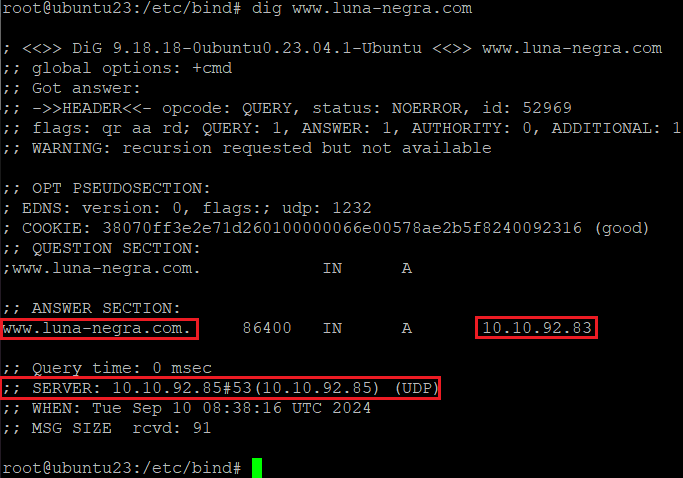
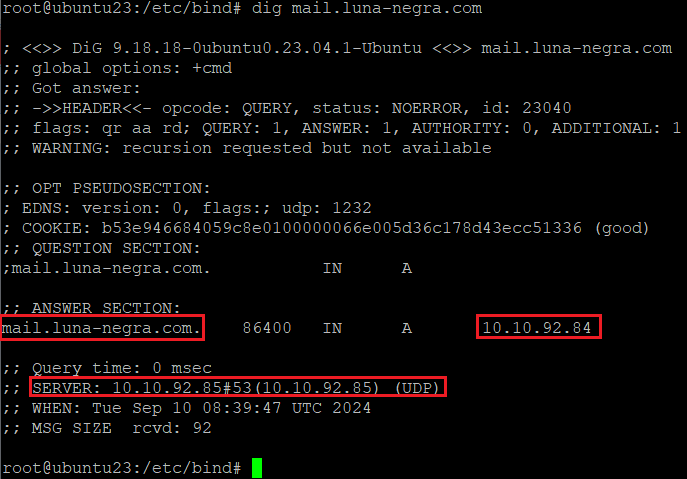
All values are returned as zone file of 'luna-negra.com'. Next, I will test my custom DNS server from remote windows labtop.
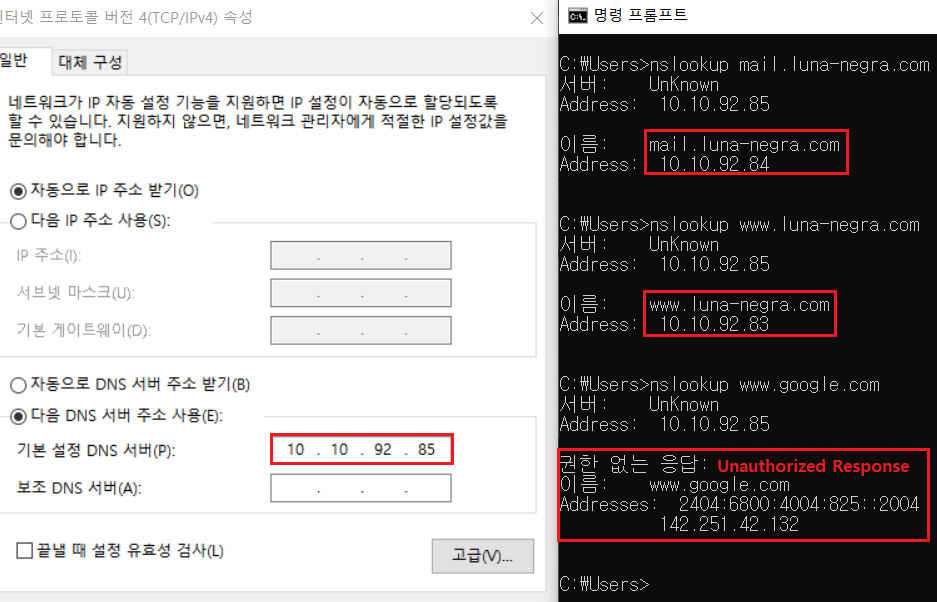
You can see the unauthorized response when I executed a command with 'google.com' domain. Because, my custom DNS server did not have any information about 'google.com' domain, so it recursively relayed the query to the another DNS server(8.8.8.8) which was set on my Ubuntu machine. DNS server 8.8.8.8 returned the response to the custom DNS server, and custom DNS server transmit that data to the endpoint. Custom DNS server did not provide IP data directly, therefore windows endpoint showed "Unauthorized Response".
IV. References