$ 0008. Create Template and Validate Input with Django Forms
| Author | luna-negra |
| Created On | 2024-08-17 08:19:00+00:00 |
| Edited On | 2024-08-17 08:19:00+00:00 |
| Tags | #django #basic forms #simple website example |
I. Preview
With a knowledge about django's basic architecture, you can create your website with it, as you can see at my previous post. However, Once you are familiar with the django's basic architecture, you may recognise that some parts have some repeated work processes or inconvenient things. Let us have a look at it.
I would like to create a simple website that users can send their personnel information to the django server. It does only have a storage function, so my website will have only 'index' view and index.html will be shown like below.
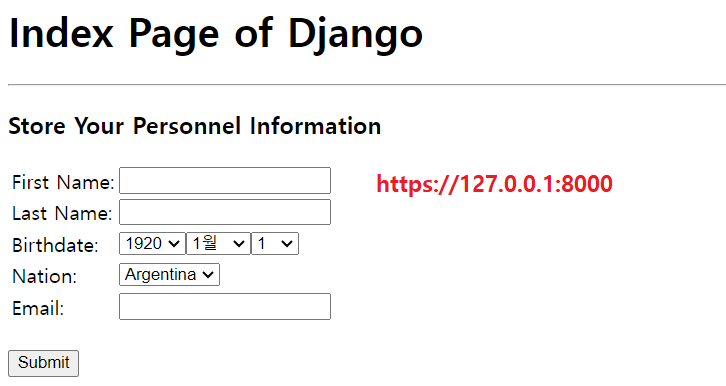
The 'index' view will accept "GET" and "POST" communications so that the users can submit their data through the index view. Let me make it in a minute. First, I will create a new application named 'formtest' and set urls.py at my project folder and newly created application folder.
1
2
3
4
5
6
7
8
9
10
11
# [ project_folder / urls.py ]
#
#from django.urls import path, include
#from django.contrib import admin
#from formtest import urls as urls_formtest
#
#
#urlpatterns: list = [
#    path("admin/", admin.site.urls),
#    path("", include(urls_formtest))
#]
# * Do not forget to add new application AppConfig to 'settings.py' 1
2
3
4
5
6
7
8
9
10
# [ formtest / urls.py ]
#
#from django.urls import path
#from formtest import views
#
#
#app_name: str = "formtest"
#urlpatterns: list = [
# path("", views.index, name="index")
#]
Next, I will create a models.py in an application folder.
1
2
3
4
5
6
7
8
9
10
11
12
13
14
# [ formtest/models.py ]
#
#from django import models
#
#
#class Members(models.Model):
#    f_name = models.CharField(max_length=30)
#    l_name = models.CharField(max_length=30)
#    b_date = models.DateTimeField(blank=False, null=False)
#    nation = models.CharField(max_length=30)
#    f_name = models.EmailField()
#
#    def __str__(self):
#        return f"Member-{id}"
# * Do not forget to makemigrations and migrate to apply your models.py file to database.Once you finished migration, just write down the 'views.py' file's frame like below.
1
2
3
4
5
6
7
8
9
10
# [ formtest / views.py ]
#
#from django.shortcuts import render
#from django.views.decorators.http import require_http_methods
#from formtest.models import Members
#
#
#@require_http_method(["GET", "POST"])
#def index(request):
#    return render(request=request, template_names='index.html', context=None)
Last, I will create 'index.html' and locate it in templates forder.
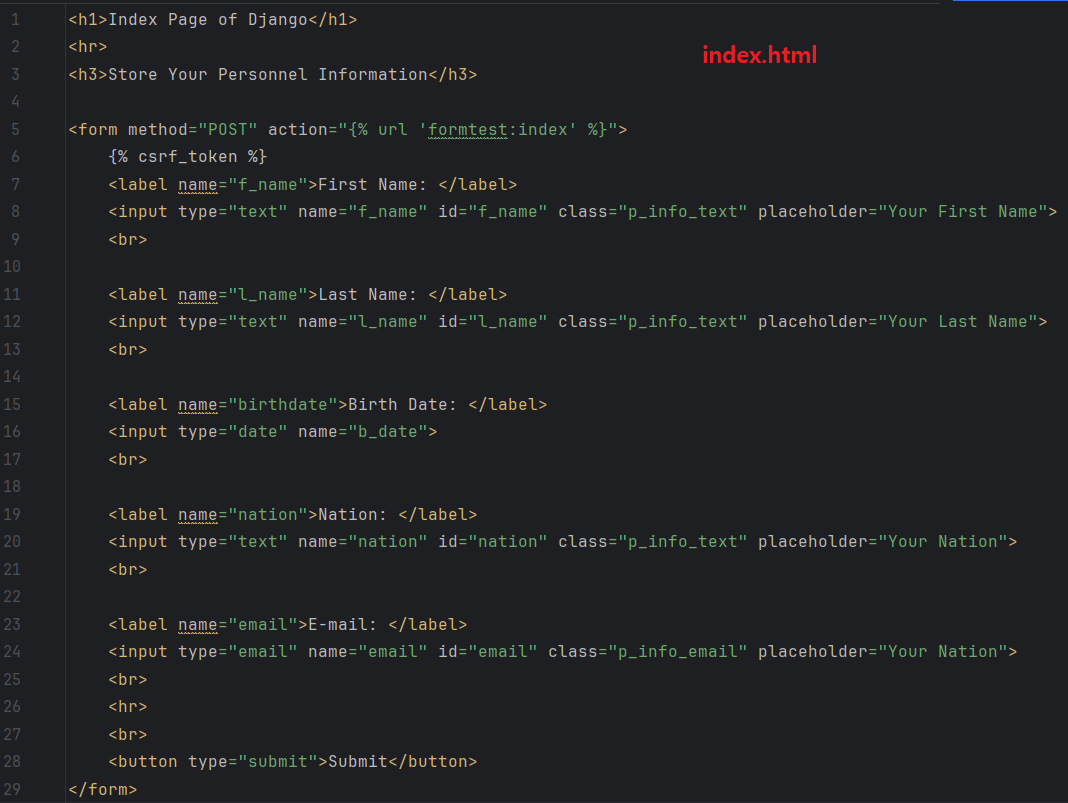
The result of all works will be displayed like below.
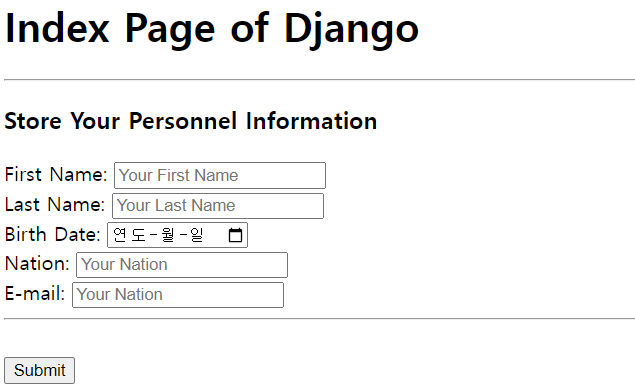
Now, I can get a POST data at my views.py file with variable 'request'. Then, I can put them on my database file.
1
2
3
4
5
6
7
8
9
10
11
12
13
14
15
16
17
18
19
20
# ...
#from datetime import datetime
# ...
#def index(request):
#    if request.method == "POST":
#
#        data: dict = request.POST
#        f_name: str = data.get('f_name')
#        l_name: str = data.get('l_name')
#        b_date: str = datetime.strptime(data.get('b_date'), "%Y-%m-%d")
#        nation: str = data.get('nation')
#        email: str = data.get('email')
#
#        new_info: Members = Members(f_name=f_name,
#                                    l_name=l_name,
#                                    b_date=b_date,
#                                    nation=nation,
#                                    email=email)
#        new_info.save()
#    return render(request=request, template_name='index.html', context=context)
It would work well... however, I did not finish to make it in a minute. The main cause of the inefficiency is a repeated code in HTML, views.py and models.py. The 'views.py' will handle the data from 'index.html' file and 'models.py' file also do that from the 'views.py' file. If there is an integrator module that can create index.html's input and insert data to the database, the workload would be somehow relieved.
Also, there is another problem that would be caused by clients at the part for typing nation. There are not choices for nation input, so user can type any text in it even though it is not a nation name. In this reason, views.py should validate user's input so that it would give more work on django's 'views.py'. According to the MVT model, views are better to handle the mapping between front-end and urls.
Fortunately, Django offers these functions with file called 'forms.py' by getting involved between views.py and models.py.
II. Architecture of Django Form
Then, we have to know how the forms works in a Django framework. In a brief, forms file are consist of some fields and they create HTML tags related to data input. This HTML Tags are able to be delivered to the templates file via context. It makes you more convenient because you do not have to make an additional tags manually in html file. If you import a model class into a 'views.py' file, you can also handle database CRUD.
However the most awesome thing is that 'forms.py' file has function for validate user's input. With 'forms.py' file, it is easier to handle the views because you can hide the validating code at 'forms.py' file.
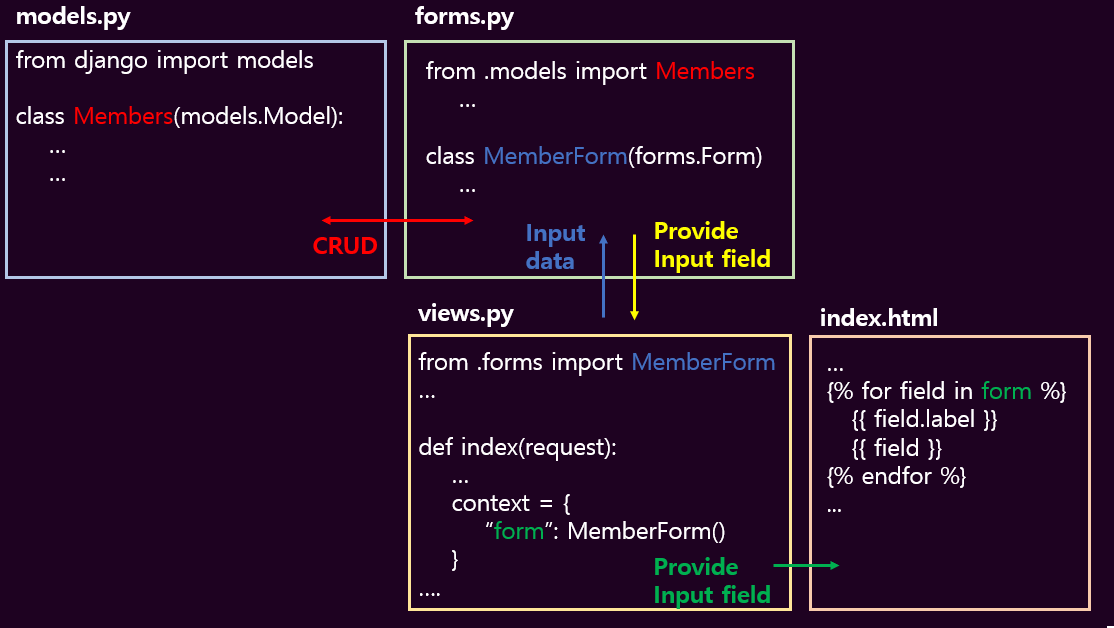
According to this architecture, there should be a few fields in forms.py so created input tags would be transmitted to the 'views.py'.
III. Create a Simple Example
1. Create Input Tags on HTML Files.
Let me create a 'forms.py' file first. It should include fields for user's input. Forms.py file has one or more form class and each class can have a different fields.
1
2
3
4
5
6
7
8
9
10
11
12
13
14
15
16
17
18
19
20
21
22
23
24
25
26
27
28
29
# [ formtest / forms.py ]
#
#from django import forms
#from formtest.models import Members
#from datetime import datetime
#
#
#NATION_LIST: tuple = (
#    ('HR', 'Hrvatska'),
#    ('USA', 'USA'),
#    ('ETH', 'ሪፐብሊክ'),
#    ('JPN', '日本国'),
#    ('ARG', 'Argentina')
#)
#
#
#class MemberSaveForm(forms.Form):
#    f_name = forms.CharField(max_length=30, label="First Name")
#    l_name = forms.CharField(max_length=30, label="Last Name")
#    b_date = forms.DateField(widget=forms.SelectDateWidget(years=range(1920, datetime.now().year + 1)),
#                             label="Birthdate")
#    nation = forms.ChoiceField(
#        widget=forms.Select,
#        choices=NATION_LIST,
#        required=True,
#        label="Nation"
#    )
#    email = forms.email(blank=False, null=False, label="email")
#
In this status, you can call the class 'MemberSaveForm' at the 'views.py'. When you print that object, you can see some HTML tags that produced by 'forms.py'.
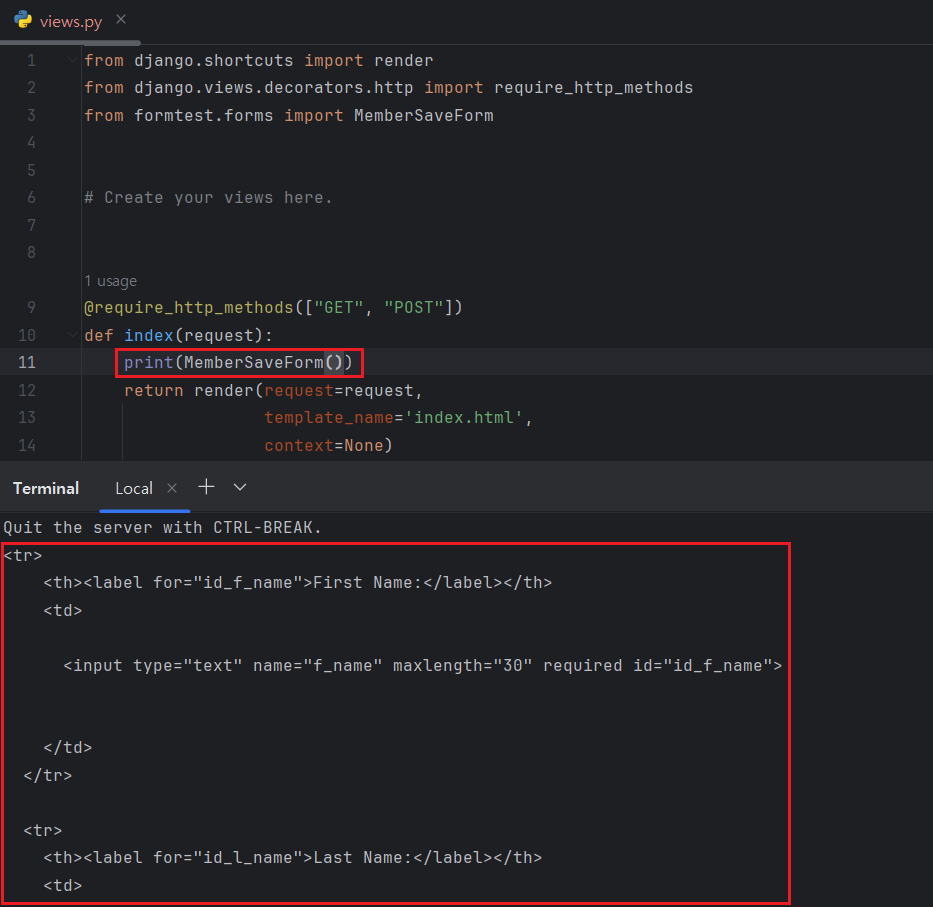
And once you send this object with context, you can see the input tags on your templates.
1
2
3
4
5
6
7
8
9
10
11
# [ formtest / views.py ]
#
#from formtest import MemberSaveForm
#...
#def index(request)
#    context = {"form": MemberSaveForm()}
#    return render(request=request,
#                  template_name='index.html',
#                  context=context
#    )
#
The 'index.html' file only contains approximately 10 lines of HTML Tags. Comparing to the previous 'index.html' file, the number of lines is significantly decreased.
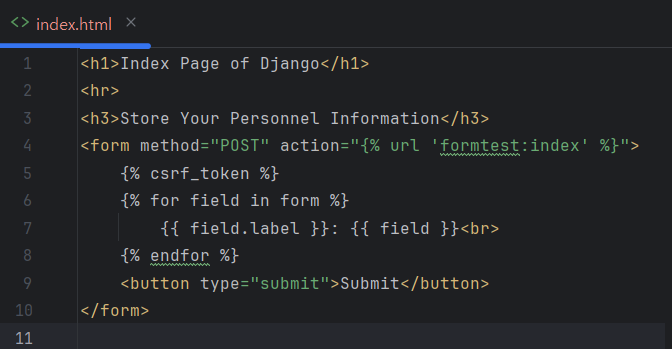
If there is no exceptions in files, you can see the input form at the browser.
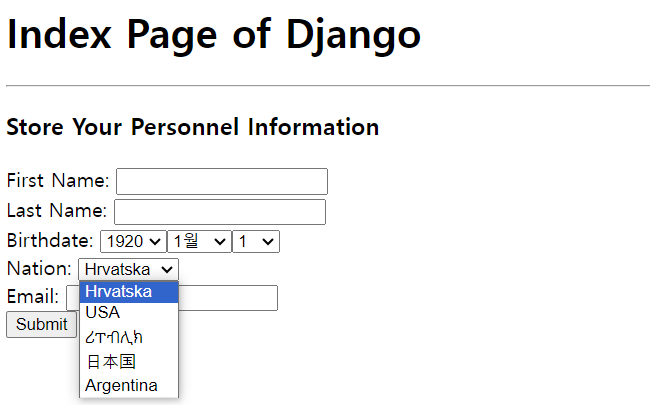
2. Validate and Save Input Data.
Now, let me get user's personnel input typed by user. To get these information, use 'request' variable at the 'views.py' file.
1
2
3
4
5
6
7
8
9
10
11
12
13
14
# [ formtest / views.py ]
# ...
#@require_http_methods(["GET", "POST"])
#def index(request):
#    context = {"form": MemberSaveForm()}
#
#    if request.method == "POST":
#        input_info: dict = request.POST
#        form = MemberSaveForm(data=input_info)
#        print(form)
#
#    return render(request=request,
#                  template_name="index.html",
#                  context=context)
# * print(form) will print out the user's input on the terminal.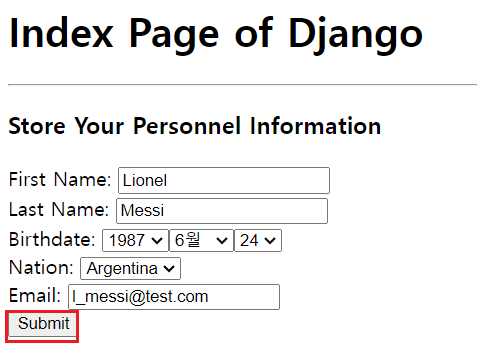

This input data can also be transmitted to the form class. This class inherits django's Form class and that has some methods for validating. If you are using methods 'is_validate()' and 'clean()' after calling form class with 'data' arguments.
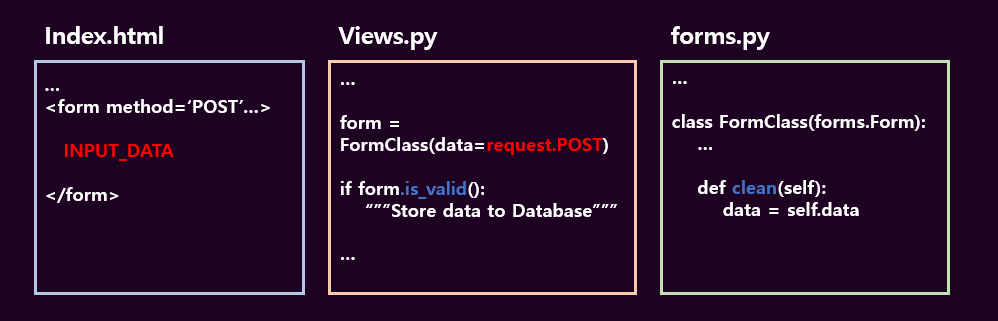
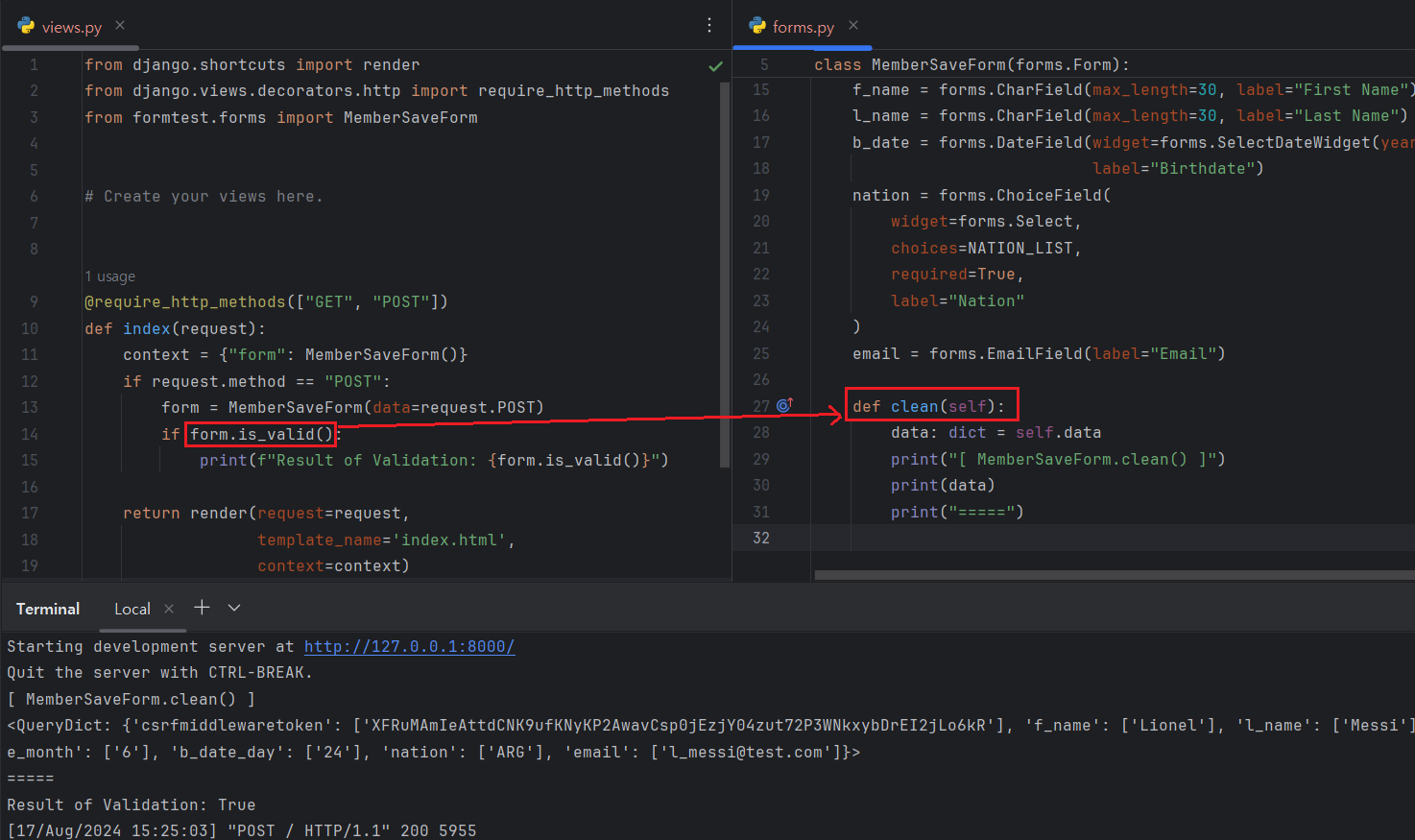
The method 'form.is_valid()' will check the valid status of input value by clean() function. If the 'clean()' method has a logic to validate input data and there are no error, 'clean()' method always returns true to 'is_valid()'. I create some logic that filter the strange email address having 'test.com' at the end of the input.
1
2
3
4
5
6
7
8
9
10
# [ formtest / forms.py ]
#
# ...
# def clean(self):
#     data: dict = self.data
#     email: str = data.get("email")
#     if email.endswith("test.com"):
#         raise Exception(f"Email address \'{email}\' is not valid.")
# ...
#
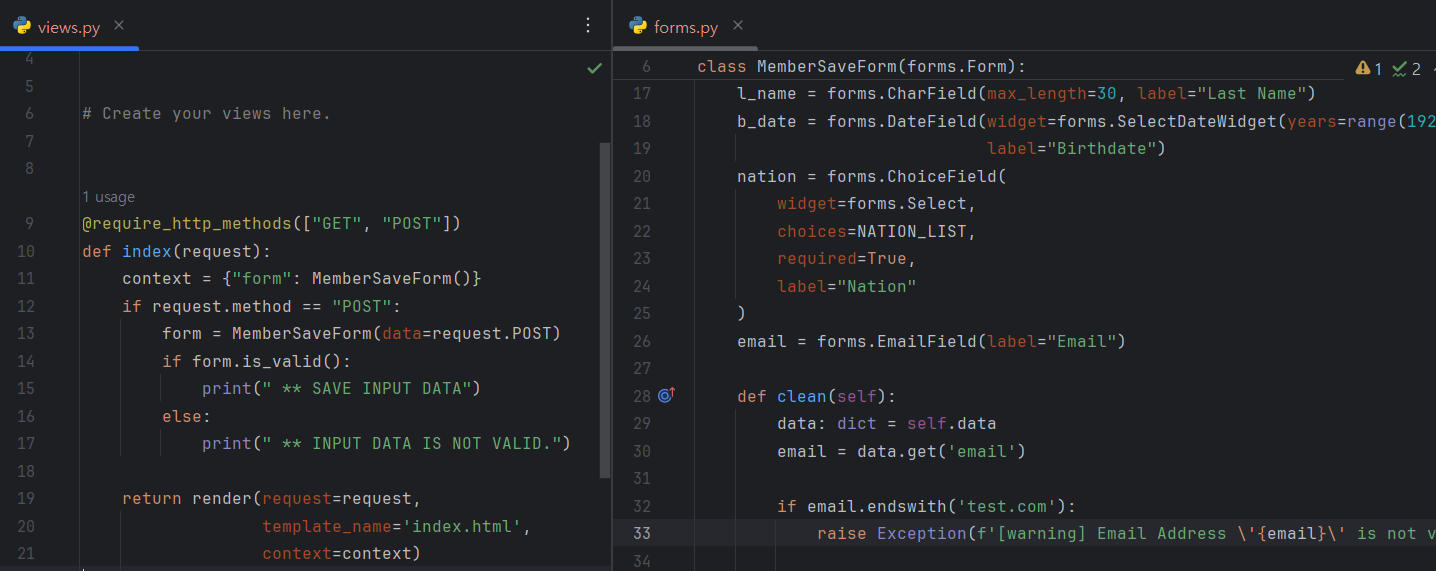
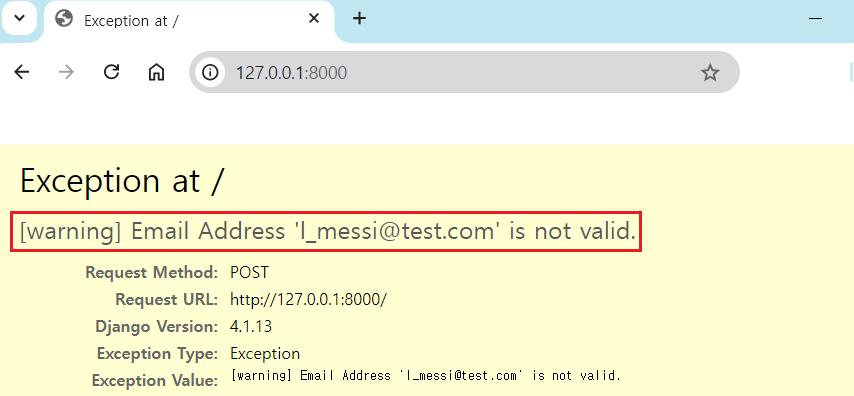
The basic python 'Exception' will make a critical symptom that user will misunderstand there are some errors in site. So, If you need to raise an error related validating user's input, you should use django's built-in exception.
1
2
3
4
5
6
7
# [ formtest / forms.py]
# ...
# from django.core.exceptions import ValidationError
# ...
#     if email.endswith("test.com"):
#         raise ValidationError(f'[warning] Email Address \'{email}\' is not valid.')
# ...
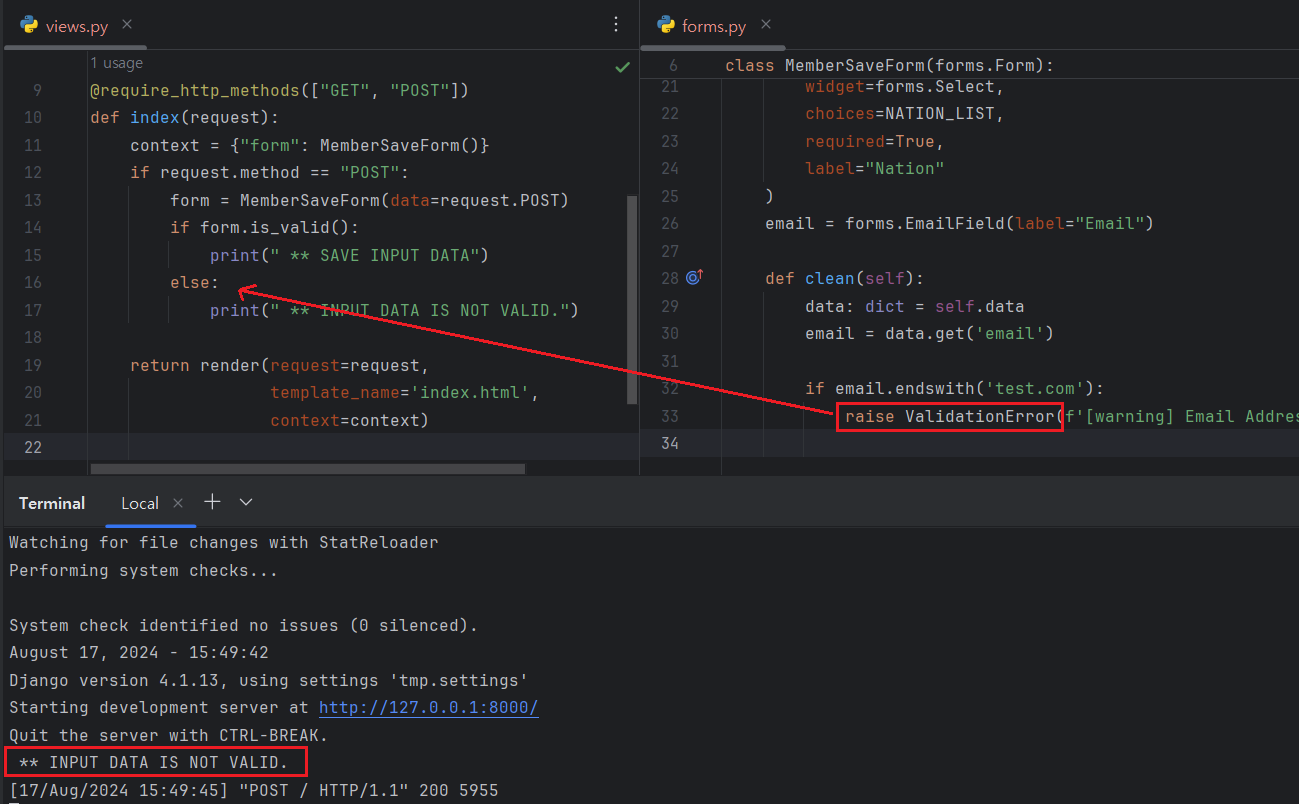
With Exception 'ValidationError', you do not know whether your input data is saved to database successfully on not. So, I also have to send the exception string to the 'index.html' file.
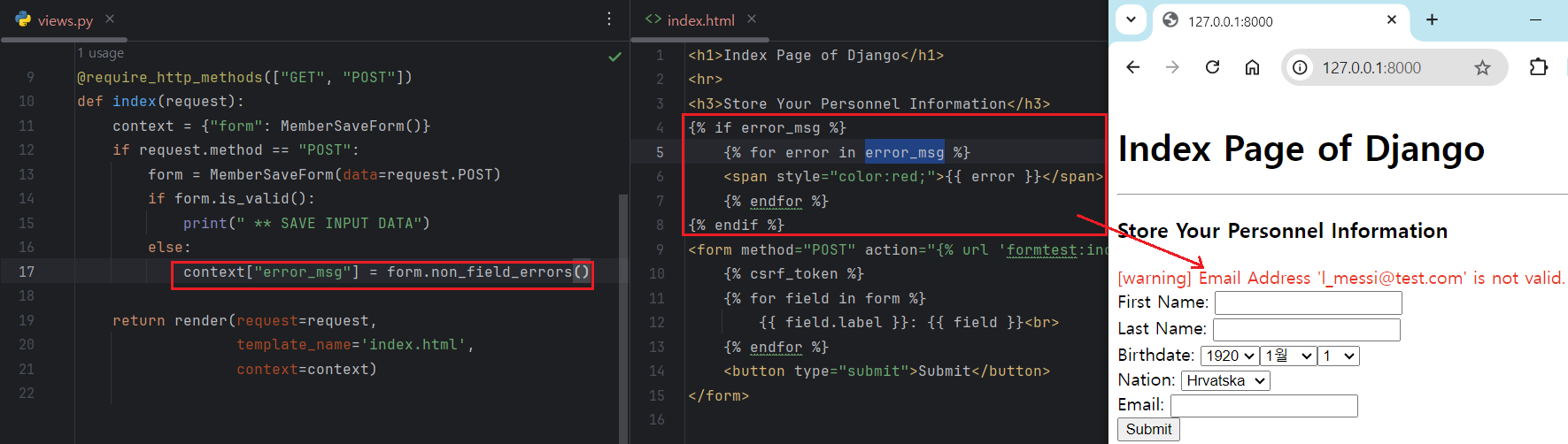
Form class has class variable named 'errors'. If clean() raises ValidationException, raised exceptions will be added to the errors.
You can separate validation process with field name with method 'clean_{field_name}()'. Let me assume that I have to valid nation will not be 'USA'. Then,
1
2
3
4
5
6
7
8
# [ formtest / forms.py]
# ...
#def clean_nation(self):
#    nation = self.data.get("nation")
#    if nation == "usa":
#        raise ValidationError("[Warning] Nation should not be 'USA'")
#
#    return nation
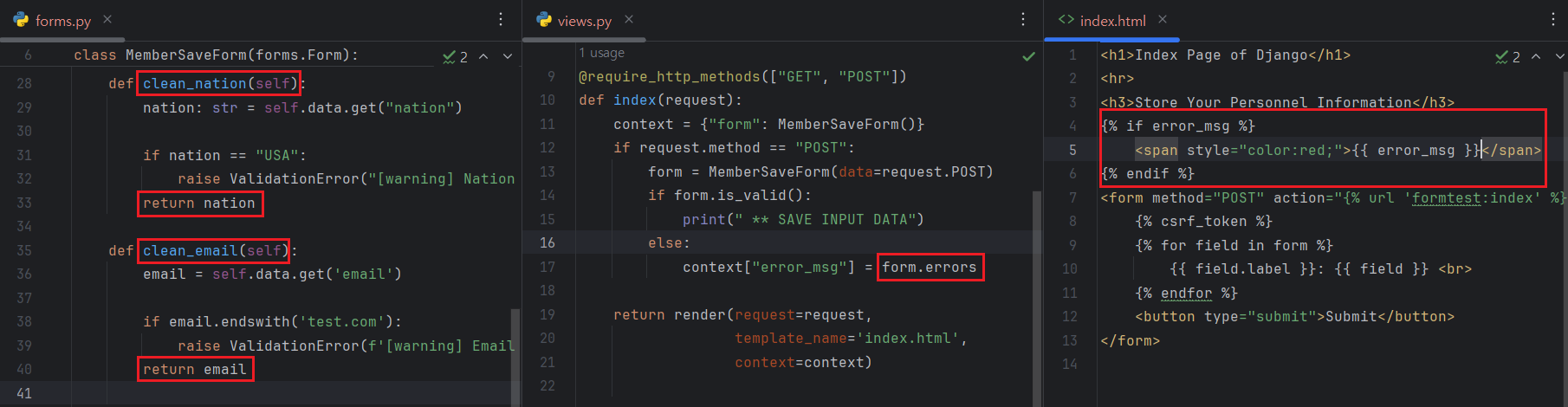
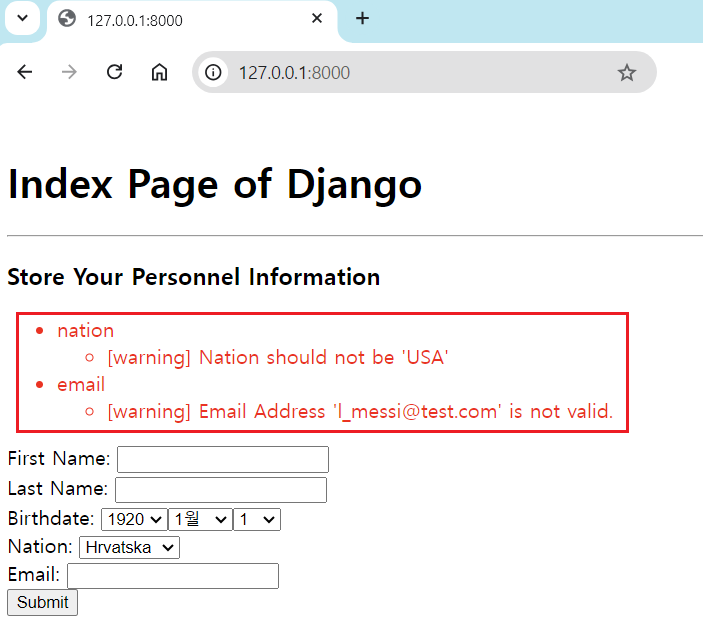
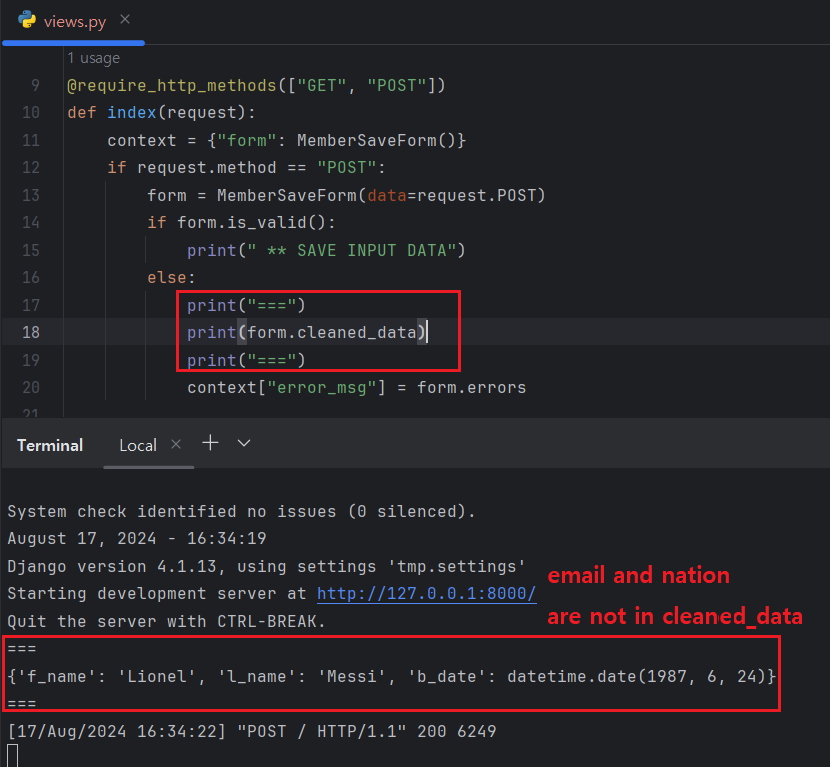
Please be advised that if you want to use 'clean_{field_name}' method, you must return the field value at the end of the code. If you forget it, form class will understand that user input is not passed validation process. 'is_valid()' refers to the dictionary variable named 'cleaned_data' and if one of fields are extracted from it, is_valid() will be False.
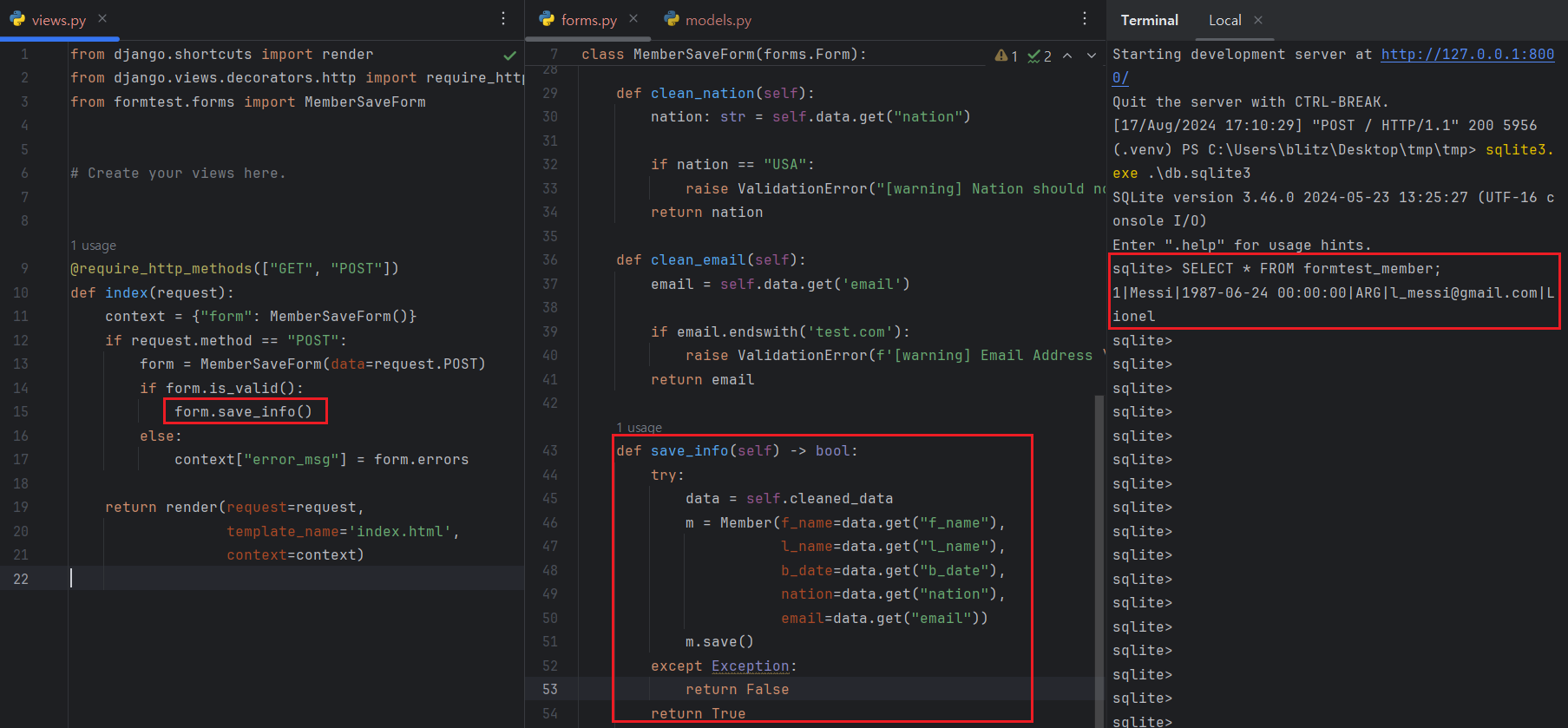
Saving validated data is easy. Just use your model class defined and write down the saving logic on your 'models.py' file.
IV. References