$ 00014. Apply ssl on SMTP Server
| Author | luna-negra |
| Created On | 2024-09-28 08:32:00+00:00 |
| Edited On | 2024-09-28 08:32:00+00:00 |
| Tags | #Ubuntu #Postfix #SMTP #SSL |
I. Preview
If you want to send email starting from your custom mail server, it is recommended to apply TLS or SSL to secure the communication. Nowadays, most mail providers also require to set SSL when the sender sends their message to their server, to prevent fraud such as spamming.
Certainly, there are more techniques that should be applied on the server - SPF, DKIM and DMARC - but they are not important topic of this post. So I would like to provide the protocol that everyone can apply TLS or SSL on your custom mail server.
II. Set Previous Environment
In this post, I will use Ubuntu 23.04 for OS and postfix package for mail server. Therefore first, I will install postfix package after upgrading and updating apg-get.
1
2
3
4
5
6
7
8
#  :"Upgrading apg-get"
#  apg-get upgrade
#
#  :"Updating apt-get"
#  apg-get update
#
#  :"Install postfix"
#  apt-get install postfix
When you finished postfix installation, please check the postfix service is running.
1
2
#  :"Check the 'postfix' Service is Running"
#  systemctl status postfix
Second, you have to create your own private and public key which will be used to apply TLS and SSL. I wrote the post about creating the private and public key on ubuntu, so you can create your keys referring to it.
After creating your keys, please remember the key's absolute path.
The third one is an optional. I have installed named package to make my machine work as a DNS server. The DNS configuration contains my domain information, so when I throw the query with my domain to DNS server, it would be return the related information. If you want to know about installing DNS on ubuntu, please refer to the post below.
III. Protocol to Set Secure Mail Server
To apply SSL and TLS, you have to edit config file of postfix service. This file is located in /etc/postfix, and named as 'main.cf'.

Open it and add new config keys and values to apply SSL.
1
2
3
4
5
6
7
8
9
10
11
12
13
14
15
16
17
18
19
20
21
22
23
24
25
26
27
28
29
30
31
32
33
#  :"Configure whether tls use or not"
#  smtpd_use_tls=bool
#
#  :"Edit the path of CA certificates"
#  smtpd_tls_cert_file=[PATH_FOR_CA_CERTFILE]
#
#  :"Edit the path of CA private key"
#  smptd_tls_key_file[PATH_FOR_CA_CERTIFICATE]
#
#  :"Set the SMTPD security level of SSL"
#  smtpd_tls_security_level=may
#
#  :"Accept headers from clinet request"
#  smtpd_tls_received_header = yes
#
#  :"Set the session cache time: default is 1 hour."
#  smtpd_tls_session_cache_timeout = 3600s
#
#  :"Set the log level for TLS"
#  smtpd_tls_loglevel=1
#  smtp_tls_loglevel=1
#
#  :"Set the version of SSL"
#  smtpd_tls_protocols=!SSLv1, !SSLv2
#  smtp_tls_protocols=!SSLv1, !SSLv2
#
#  :"Set the TLS Cipher."
#  smptd_tls_ciphers="high"
#  smtp_tls_ciphers="high"
#
#  :"Set the SMTP security level of SSL"
#  smtp_tls_security_level=may
#  smtp_tls_ciphers="high"
# * Default config contains 'smtpd_tls_CApath' key. Please convert it as a comment.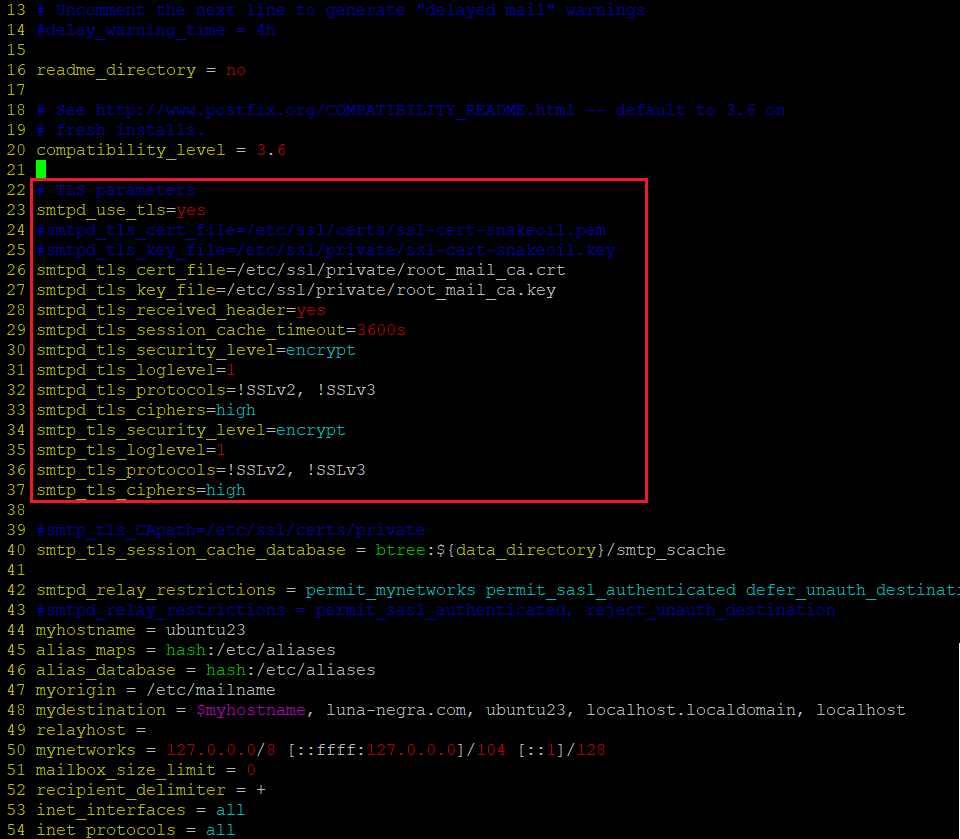
After editing the config file, restart the postfix service with command below.
1
2
#  :"Restart postfix service
#  systemctl restart postfix
If the restarting process is finished without error, please check whether the SSL is applied on your mail server or not by using command below.
1
2
#  :"Check whether the SSL/TLS is applied or not"
#  openssl s_client -connect {MAIL_SERVER_IP or DOMAIN_FQDN}:25 -starttls smtp -brief
# * Please be advised that I have already registered mail server's information on my DNS Configuration.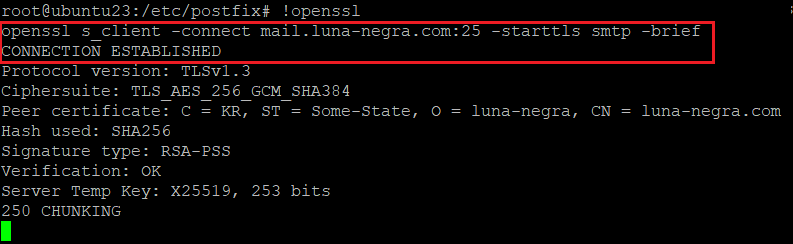
If you can see the information about your certificate, you can use your Mail server with SSL/TLS. However, If you have some error lines after second line, please debug the issue on the configuration file 'main.cf'.
Now, you can send and receive email with or without SSL/TLS on port 25.
For a couples of years ago, custom mail server on linux machine can send mail to global mail server such as google or yahoo, but nowadays this action will be blocked due to the threatening of spam mail. Therefore, if you want to send mail from your custom server, you have to use global smtp server as a relay server and apply SPF, DKIM and DMARC, which are related to the mail securities.
Here is a link of post for testing custom mail server, which was done 3 years ago.
IV. References
- N/A